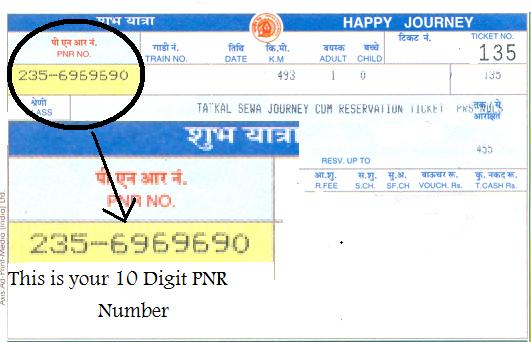
The Indian railway is one of the largest rail networks and carries more than 8 billion passengers annually. Since the time computer reservation system was introduced in Indian railway, PNR record has been introduced. PNR means Passenger Name Record which contains itinerary of all passengers travelling. PNR number is a system that generates a unique 10 digit number which is printed on the upper right corner of Indian Railway Ticket.
Using the PNR status, the details of passenger records are stored in the server of the computer system of Railways throughout the passenger’s journey. Nowadays PNR status can also be checked by SMS instead of visiting the railway ticket counter every time due to which it saves lots of time. In this article we will know how to check PNR status by SMS.
139 Service
139 service is the oldest method used. It is a direct official service from IRCTC and it works 24 hours a day. The 139 service can be used from all over India. In this service passenger need to send the 10 digit PNR number to 139 without any spaces. Example: PNR1234567890. This service is a premium service and is chargeable. The charges are more than the normal rate of an SMS.
One significant advantage of using the 139 service is that it provides accurate and real-time information. This can be crucial during periods of high travel demand, such as festivals and holidays, when train schedules are more prone to changes. It should be noted that the reliability of this service is one of the reasons passengers continue to use it despite the charges.
You might also be interested in: how to claim SpiceJet miles

Mobile Number
The 139 service is chargeable for mobile users. So, checking the PNR number every hour might become an expensive task. So, Google has introduced a service on mobile numbers. Simply SMS your PNR number and send it to 9773300000 to avail this service. The charge will be the same rate which applies for a normal SMS and hence there is no need to pay for any premium service. It is also economic and through this method PNR status can be checked frequently without creating a hole in your pocket.
Another benefit of this service is that it is widely accessible, even in remote areas, thereby ensuring that more people can check their PNR status with ease. This accessibility makes it a preferred choice for travelers who are on the move and need quick updates on their travel plans without incurring additional costs.

GPRS enabled phones
You can also check your PNR status using the GPRS service on your mobile. Just connect the Internet and go to the website www.indianrail.gov.in and get the "Check PNR" field. There you can type the 10 digit PNR number and check the status directly. This is not an SMS service but it is quite economic as the only cost is the data charge and no actual money is spent like in the above two services.
For those who prefer a more interactive approach, using the GPRS service can be advantageous. The website often provides additional details such as train schedules, delays, and platform information, which can be helpful for planning trips more efficiently. Moreover, using GPRS can be beneficial for those who are comfortable with digital interfaces and prefer accessing information online.

Other information on your ticket
A railway ticket also contains the following main information:
- Passenger name
- Travel agent details
- Ticket details – ticket number
- Itinerary
- Name of the person booking the ticket
In addition to the above, the ticket may also include information such as the train number and name, coach and seat number, and departure and arrival times. This ensures that passengers have all the necessary details for their journey at a glance. Having this information readily available can be particularly useful in case of any discrepancies or if there are last-minute changes to the travel itinerary. Keeping a copy of the ticket, either physical or digital, can help resolve any issues that may arise during travel.
If you want to read similar articles to How to check PNR Status by SMS, we recommend you visit our Travel category.